Joddat Rafih, January 22nd 2026
Hello there, fellow dual-monitor setup friends! If you’re like me, you enjoy multi-tasking. But when your main screen is locked for something graphically intensive – like high-res gaming, or video editing – you really don’t want to have some video you’re watching on your second monitor becoming so choppy you’d swear it was stop-motion.
Welcome to an issue I encountered recently! It’s an issue that I haven’t really had come up with most games that I play, but for some reason Diablo 4 is an unoptimized mess. The game suffers from memory leaks that should have been fixed by now – the game is approaching the 3-year mark, with the second expansion coming out in a few months. Get it together dev team!
So here I am, AFK (away from keyboard) leveling and durdling around, because it’s a great game to “play” while I want to catch up on YouTube, Netflix, etc. and the video is almost unwatchable, while also making my game stutter between dungeon transitions. The first thing I checked, was whether hardware acceleration was turned on in the browser – I just switched to Brave and thought maybe it’s not on by default. To find this option, you just have to go to the settings and search for “acceleration” – it’s the only highlighted option and make sure it’s on.



It was on! Why does this system, that I perfectly built, want to play with my emotions? I mean, I have a 7700x, 4080 Super & 64GB DDR5 6000Mhz RAM…this shouldn’t be a thing! So, I asked Gemini why I’m having issues and it said, “get good, noob”. AI is a menace. In an effort to get gooder, I searched about why this might be happening and how to fix it. It appears I’m not the only one who had been aboard this struggle bus – reddit had my back.
![Google search of "youtube choppy when gaming reddit" and a reddit search result titled "[Workaround] YouTube, Livestreams stuttering while..."](https://superinterestingblogs.com/wp-content/uploads/2026/01/image-4.png?w=891)
The first link to come up when I searched “youtube choppy when gaming reddit” was this amazing post by user GiNTONiC_1453. This is where I learned about the “graphics settings” in Windows – something I’d never even thought about before. I hit the windows search bar and decided to check this out for myself and my mind was expanded.

In these settings you can manually choose if you want an application to run off the motherboard’s integrated graphics (iGPU – runs off of your CPU’s built-in graphics chip), your PCIe GPU (dedicated graphics card), or let Windows decide what to use – it will pick power saving (IGPU) or high performance (PCIe GPU).
Windows…is fallible. Because of that, I noticed that Brave was set ‘Let Windows decide’ and it thought that high performance (my NVIDIA GPU) was the way. Spoiler alert: it was not the way.
I’m not sure if this is an issue with every browser, but for me – it definitely was with Brave. Some commenters on the OP’s post said that just disabling hardware acceleration was enough for them – for me it wasn’t and I know that my system is more than capable of handling browser graphics, if the option is to offload the work to my iGPU.
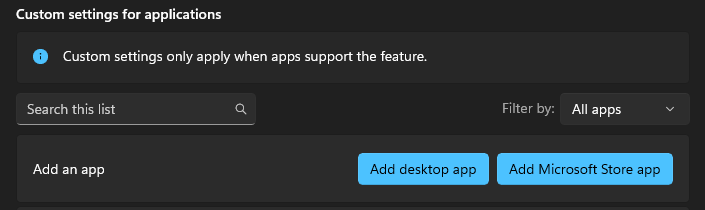

Navigating the graphics settings per app is hopefully pretty easy for users. You just expand the app and the drop-down menu (pictured above) will show you your options – there are only four of them and the first one is the GPU preference. If the app you’re looking for isn’t in the list, you can add it by clicking “Add desktop app” and browse to the directory to find the executable for it and then add. If you use a shortcut to open the app, right click it and go to “open file location” and that will take you directly to the path you need. If you don’t use a shortcut – most of what you’ll ever install lives in C:\Program Files or C:\Program Files (x86).
Note: Do NOT curate your apps by manually setting them all to what you think they should be using, without testing each app as you do it. You can risk them not running properly and if you do this all at once, you might forget what you even did (assuming you did it to rarely used apps) and then you have to get your PC serviced and pay a tech to look at it and click a couple of things, for no reason.
The below graphic has step-by-step instructions on how to navigate and change your settings for the fix. He doesn’t mention Brave as a browser option – but this will work for any browser.
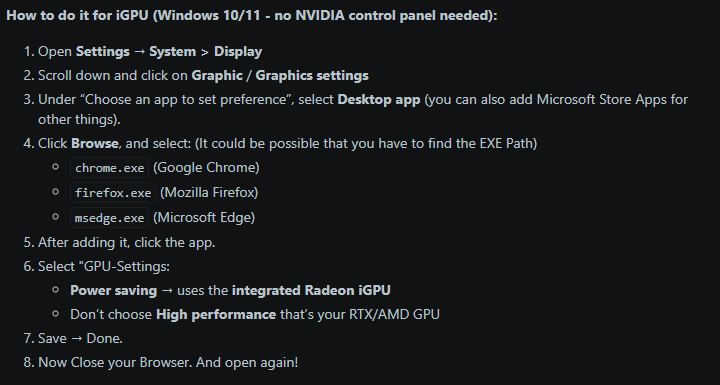
If you want to try some tweaks, before you go to the graphics settings, some users gave other suggestions that could work:
- Toggle your hardware acceleration in your browser and relaunch it, just to rule out if that will or won’t work
- Try turning off overlays to see if their resource hunger is eating too much and possible not cooperating well
- Discord, Xbox Game Bar, Steam, NVIDIA – there are quite a few
References
AMD. (n.d.). AMD Ryzen™ 7 7700X desktop processors. https://www.amd.com/en/products/processors/desktops/ryzen/7000-series/amd-ryzen-7-7700x.html
GiNTONiC_1453. (2025, July). [Workaround] YouTube, livestreams stuttering while gaming? Here’s how I fixed it (iGPU offload). Reddit. https://www.reddit.com/r/pcmasterrace/comments/1lp7f0f/workaround_youtube_livestreams_stuttering_while/
Microsoft. (n.d.). How to fix apps that appear blurry in Windows 10. https://support.microsoft.com/en-us/windows/how-to-fix-apps-that-appear-blurry-in-windows-10-e144618e-f51b-4d7a-18b6-b5211516089c
Brave Settings Screenshots: “Figure 1, 2, and 3: UI navigation for hardware acceleration. Captured by Joddat Rafih, January 2026. CC BY 4.0.”
Reddit Search Result: “Figure 4: Community discussion on GPU offloading. Source: Reddit.com. Captured by Joddat Rafih, January 2026. Fair Use for educational commentary.”
Windows Graphics Settings: “Figure 5 and 6: System-level graphics preference configuration. Captured by Joddat Rafih, January 2026. CC BY 4.0.”
 Joddat's Tech Blog
Leave a comment